
Many businesses, when looking to equip their facilities with a security system, focus primarily on purchasing advanced cameras and high-end storage hardware. While these tools certainly enhance the quality of monitoring, they are by no means sufficient for truly effective security oversight.
The center of any robust system is the Video Surveillance Software. This is the specialized Video Management System (VMS) that empowers panel managers and operators with comprehensive control and real-time oversight of every event. In the world of professional security, Milestone VMS stands out as the industry leader, turning raw footage into actionable intelligence.
In this Milestone XProtect integration guide, we will explore how this powerful platform serves as the ultimate Milestone connector, bridging the gap between hardware and high-level security management.
What is Milestone Software?
Milestone Systems is a global industry leader in open-platform Video Management System (VMS) technology. Their flagship product, Milestone XProtect, acts as the brain of a security system, allowing businesses to view, record, and manage video feeds from IP cameras across various locations.
What truly sets Milestone apart is its open platform architecture. Unlike proprietary systems that lock you into a single manufacturer’s hardware, Milestone provides an open Application Programming Interface (API) and a comprehensive Software Development Kit (MIP SDK). This allows for seamless integration via a dedicated Milestone connector with thousands of third-party IP cameras, encoders, and advanced security applications, ranging from facial recognition and License Plate Recognition (LPR) to access control and perimeter intrusion detection systems.
Milestone Software Use Cases
- Retail: Retailers use Milestone not only for loss prevention and theft detection but also to integrate video analytics. By tracking foot traffic and analyzing customer behavior, retail managers can optimize store layouts and improve customer service.
- City Surveillance & Law Enforcement: Municipalities utilize Milestone for traffic management, public safety, and incident response. Integrations with license Plate Recognition (LPR) systems and gunshot detection sensors help authorities respond proactively to threats.
- Healthcare Facilities: Hospitals and clinics leverage Milestone to ensure patient safety, monitor restricted areas, and integrate with access control systems to keep track of personnel movement, managing everything from central control rooms.
- Education: Schools and university campuses integrate Milestone with mass notification systems and mobile panic buttons to ensure rapid emergency responses, giving students and faculty peace of mind.
- Industrial and Manufacturing: Facilities use the software to monitor production lines, ensure compliance with safety protocols, and integrate with thermal cameras to detect equipment overheating before a fire breaks out.
How to Install Milestone Software?
Installing Milestone XProtect requires careful planning, especially for larger environments. For a basic, single-server deployment, the process follows these general steps:
- System Requirements Check: Ensure your server meets the hardware and Windows OS requirements specified by Milestone.
Minimum system requirements for running Milestone XProtect VMS:
| Processor | Intel Core i5 or equivalent |
| Memory | 8 GB RAM or more |
| Disk Space | Minimum 100 GB of available storage |
| Graphics Card | DirectX 11 compatible |
- Download the Installer: Obtain the correct XProtect installer package from the official Milestone website or your certified distributor.
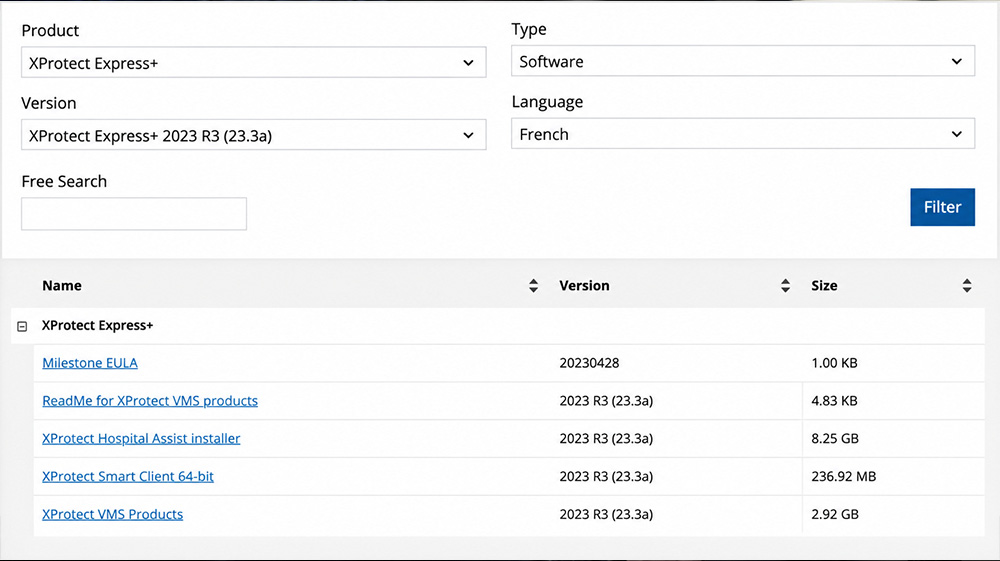
- Run the Installation Wizard: Launch the installer. You will typically choose the “Single Computer” option for smaller setups, which installs the Management Server, Recording Server, and Event Server on one machine. For enterprise deployments, a “Distributed” or “Custom” installation is used to split these roles across multiple servers.
- License Activation: Input your Software License Code (SLC) to activate the software.
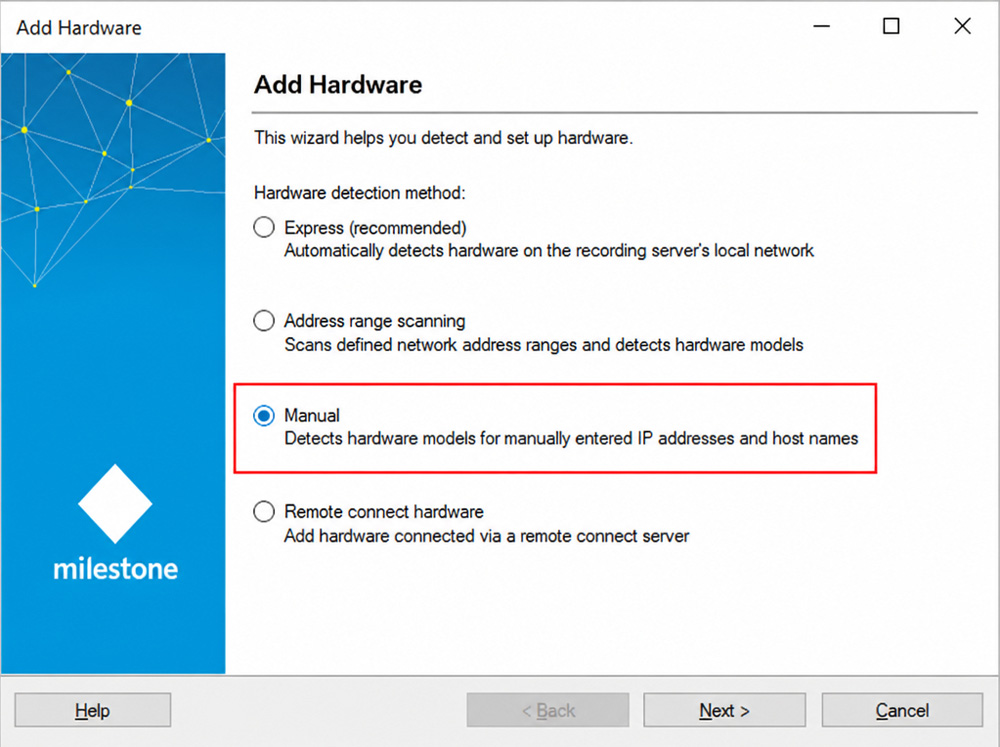
- Configuration via Management Client: Once installed, open the XProtect Management Client. Here, you will use the “Add Hardware” wizard to scan your network, authenticate, and add your IP cameras. You can enter the IP address and host manually by selecting the “manual” option.
6. Set Up Storage & Users: Define your video retention policies, configure recording storage drives, and set up user roles and permissions.
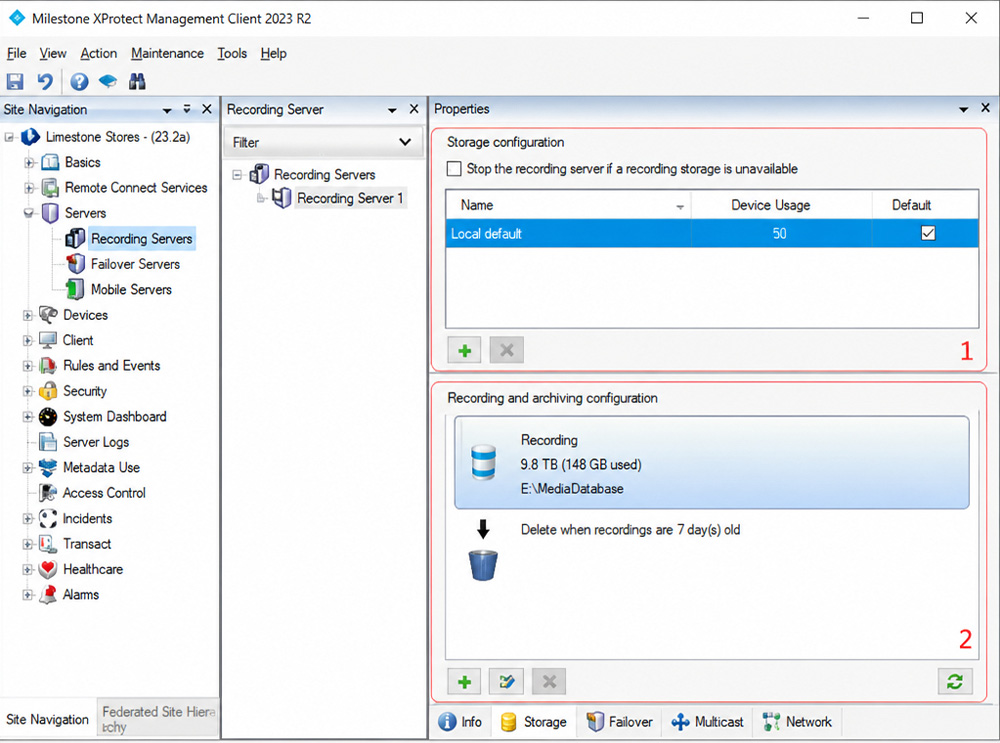
- Install the Smart Client: Finally, install the XProtect Smart Client on the operators’ workstations so they can begin viewing live feeds, reviewing playback, and exporting evidence.
Advantages and Disadvantages of Milestone VMS
When evaluating Milestone VMS for your video surveillance needs, it is important to weigh both sides of the solution.
Advantages:
- Unmatched Compatibility: It supports over 11,000 different devices from more than 150 manufacturers, giving you the freedom to choose the best hardware for your budget.
- High Scalability: You can easily scale from a small single-site operation with a handful of cameras to a globally distributed, multi-site architecture.
- Robust Ecosystem: The Milestone Marketplace offers endless third-party plugins, APIs, and the perfect Milestone connector for AI, analytics, and IoT devices, including Sphere.
- User-Friendly Interfaces: It provides tailored interfaces for different users, including the Smart Client for daily operators, the Web Client for remote access, and Mobile App for on-the-go monitoring.
Disadvantages:
- Learning Curve: Because it is an enterprise-grade solution with deep customization, setting up and configuring complex integrations can be daunting for beginners.
- Hardware Requirements: Milestone is a Windows-based system that requires dedicated, robust servers and ample storage arrays, which can increase the total cost of ownership.
- Pricing for Smaller Deployments: While highly cost-effective at scale, the licensing costs for advanced tiers (like Expert or Corporate) may be steep for very small businesses.
Different Versions of Milestone Software
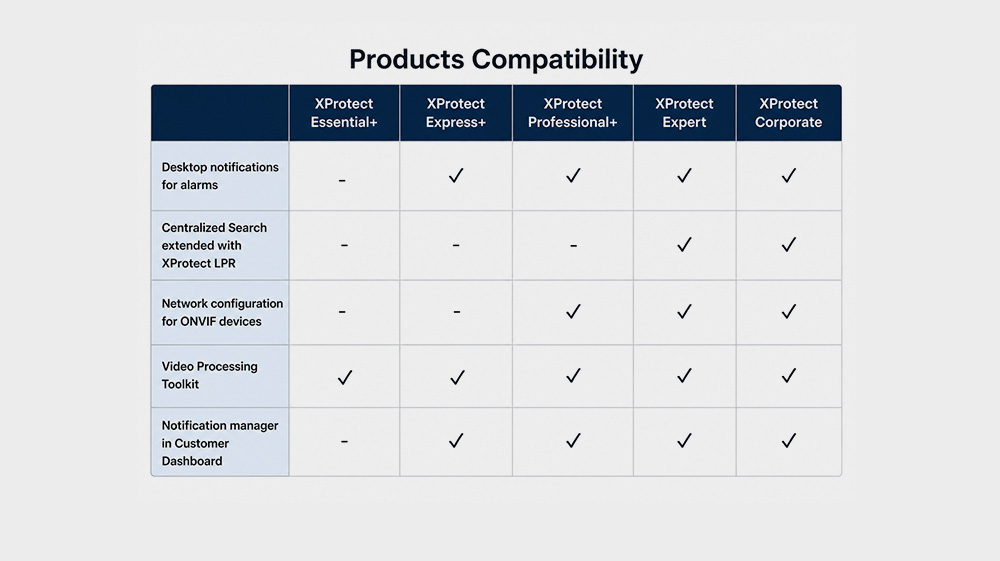
Milestone offers Milestone XProtect in several tiers, designed to meet the needs of any organization, regardless of size or complexity:
- XProtect Essential+: A free version supporting up to 8 cameras. It is perfect for small businesses or individuals wanting to test the platform before upgrading.
- XProtect Express+: Designed for smaller, single-site companies needing basic video management and integration capabilities for up to 48 cameras.
- XProtect Professional+: Built for mid-sized installations covering multiple buildings. It supports an unrestricted number of cameras and servers, making it highly scalable.
- XProtect Expert: Engineered for large-scale, central management deployments. It features advanced redundancy, edge storage support, and high-performance video recording.
- XProtect Corporate: The ultimate tier for mission-critical, distributed environments (like airports or city surveillance). It features built-in failover recording servers, centralized management of multiple sites, and the highest level of system availability.
Conclusion
Integrating your security infrastructure with Milestone Video Surveillance Software provides unparalleled flexibility, scalability, and operational intelligence. By choosing an open platform, you are not just buying a video recorder, you are investing in a future-proof foundation that will grow and adapt alongside your organization’s evolving security demands.